Jetbrains Writerside
Writerside by Jetbrains is a new IDE for writing documentation, how-tos, tutorials, API references, user guides and more.
As of today, May 30th, 2024 it is an EAP (Early Access Program) release.
The official website is at Writerside
Writerside seems very promising and after watching the intro video and a couple of hours trying different things, I was able to figure out how I want to use it and how I want my docs to be structured.
What makes Writerside great is how it uses xml and style tags to make beautiful docs like the ones you can see at the docs link for any of Jetbrains IDEs. There is a builtin Writerside previewer that renders markdown as it will be seen in the final rendered HTML. It does not work with all GFM markdown and the xml and style tags in Writerside docs will be rendered as plain text when viewed on GitHub.
Another thing I like about Writerside is that out of the box it is doing a pretty good job proofreading as I type and telling me about spelling and grammar mistakes.
Obsidian is another writing app worth looking into. For now, I'm learning Writerside because I love Jetbrains IDEs, and it helps me justify having the entire toolbox collection subscription when I usually use PHPStorm for Laravel projects and VSCode for everything else. I'll play with Obsidian more later and write some about it then.
I'll also look into Gitbook
Callouts and Admonitions
The first issue I ran into was trying to use a somewhat new feature of GFM called callouts. Writerside has what's called admonitions.
In GitHub, I can use this syntax to make a pretty note, tip, or warning, and it also works with Obsidian.
The rendered output in GitHub will look like the following examples
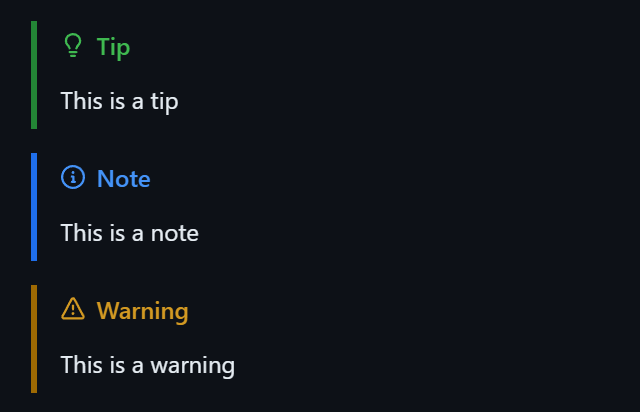
Writerside [!NOTE] will render as plain text with no extra styling. The syntax for Writerside is
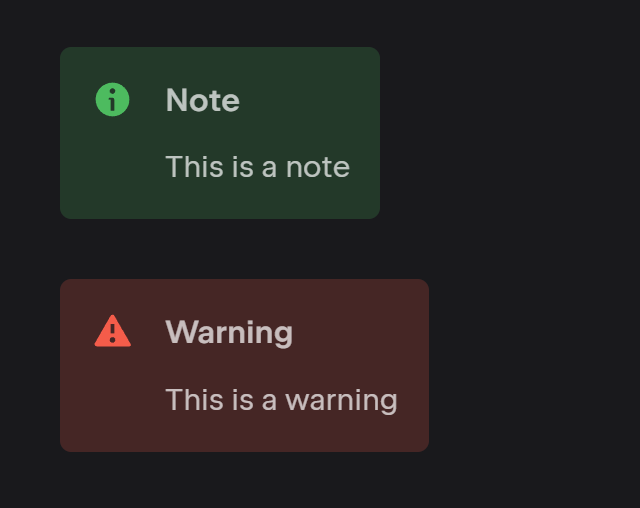
But this will render { style="note" title="Note" } in plain text for GitHub or Obsidian.
Here is the rendered output in Writerside if you use the style tag or semantic markup.
Comments are another issue. I am referring to comments that should not show in the rendered content. GitHub and Writerside both work with html comments. But Obsidian has something different.
I am learning and may find that there are ways around these minor issues but for now, here is my workaround.
First I write my document outside the Writerside directory. This way the markdown viewer is just the plain markdown viewer plugin that can be found in all the Jetbrains IDEs. The GFM features that still don't preview correctly are OK because these docs are only meant to be in the repo and viewable on GitHub where they will display correctly.
Now I have a collection of GFM documents that can be used in other ways such as pulling them into an Astro or React app (if I want to do that), and it will be up to that app to display them correctly. A GFM single source of truth.
For Writerside, I add my topic or child topic to the TOC (Table of Contents) and import the existing document or use a blank document and copy/paste the contents over to it. Now I can use all of Writerside markup and styling without affecting the original GFM document.
Hopefully in the future there will be good fixes and additional features added to address these and other issues I find while working with Writerside. I have no doubt it will get even better, and I'm also sure I will find several cases where I'm "doing it wrong".
Images
The simplest way to add images is what I'm using right now. Just add it like a normal GFM style image.
Then, when I pull the doc into Writerside, I can copy the image over to the Writerside/images directory and use Writerside syntax